

Yes, most chartered yachts offer some form of internet, but the quality swings wildly depending on where you are. Docked at a marina, expect decent Wi-Fi. A few miles offshore, cellular data still works. Beyond that, you're relying on satellite, usually Starlink, and you should confirm before booking whether it's included or billed separately.
TL;DR:
- Marina Wi-Fi is often congested and weak below deck, but a long-range receiver with a marine router can significantly improve connection quality.
- Cellular hotspots are reliable within 10 to 15 miles of shore, but their effectiveness diminishes quickly beyond that distance, especially without an external antenna.
- Starlink's maritime plans start around $185 per month for about 6 GB of ocean data, with higher prices for offshore-grade systems suitable for larger vessels.
- Weather events, such as storms and high seas, can severely disrupt satellite and cellular connections, so building in backup options is essential.
- Confirm Wi-Fi details and costs in writing before booking, including equipment type, data caps, and installation locations, to avoid connectivity surprises during the charter.
Table of Contents
- Wifi on Yacht Charter: Your Quick Options Overview
- Marina and Dockside Wi-Fi: Realistic Performance and Easy Upgrades
- Cellular Connectivity: Hotspots, eSIMs, and Marine Routers
- Satellite Connectivity for Offshore Charters: What Starlink Actually Costs
- Equipment and Setup Essentials for Reliable Onboard Wi-Fi
- Booking Checklist: Questions to Ask Before You Confirm
- How Weather Affects Wi-Fi Performance at Sea
- Wi-Fi Security on a Charter Yacht: What to Actually Do
- Managing Multiple Devices Onboard Without Slowing Everyone Down
- How Sailorix Helps You Verify Wi-Fi Before You Book
- Find a Charter and Confirm Connectivity With Sailorix
- Sources
- FAQ
Wifi on Yacht Charter: Your Quick Options Overview
Every charterer needs a mental map of three connectivity zones: dockside, near-shore, and offshore. Each calls for a different tool, and mixing them up is the fastest way to end up with a dead laptop signal in the middle of a video call.
- Marina Wi-Fi: Best when the boat is docked or anchored close to a marina with a booster. Free or low-cost, but often congested and weak below deck.
- Cellular hotspot or marine 4G/5G router: Best within roughly 10 to 15 miles of shore. Moderate cost, generally the most reliable option for steady work.
- Satellite (Starlink or maritime systems): Best for open-water or multi-day offshore legs. Higher cost, but it's the only option that keeps working once land disappears from view.
If your itinerary keeps you coastal and your data needs are light, email and messaging, a cellular plan covers you. If you're planning video calls, large file transfers, or several days at sea, satellite stops being a luxury and becomes the plan you build the trip around.
Marina and Dockside Wi-Fi: Realistic Performance and Easy Upgrades
Marina Wi-Fi has a bad reputation for a reason. The access point might sit a few hundred feet away, shared by dozens of boats streaming, gaming, and video-calling at once, and by the time that signal reaches your cabin below deck, it's often too weak to hold a connection. Marina Wi-Fi performance depends heavily on distance from the access point and network congestion, which is exactly why so many charterers report "Wi-Fi included" turning into "Wi-Fi barely works."
The fix isn't complicated. A long-range receiver mounted externally and pointed toward the marina's router can pull in a usable signal from distances that would otherwise be hopeless, and pairing it with a dedicated marine router gives you automatic failover to cellular data the moment the marina signal drops.
Before you book, ask specifically:
- Is marina Wi-Fi included, or is it a paid add-on?
- What speeds have past charterers reported at this dock?
- Does the yacht have a long-range receiver, or just a built-in phone-grade antenna?
Pro Tip: Ask for the marina's Wi-Fi network name and password before you arrive if possible. Testing the signal strength on your own phone at check-in tells you more in thirty seconds than any brochure claim.
Cellular Connectivity: Hotspots, eSIMs, and Marine Routers
A cellular hotspot is the easiest connectivity option to set up and, near shore, often the most dependable. The catch is range. A phone's built-in antenna struggles once you're a few miles out, while a dedicated marine router with an external antenna clears obstructions and holds a usable signal much farther out. External antennas and marine-grade routers provide meaningfully more stable connections than a standard phone hotspot, particularly when the antenna array covers a wide frequency range spanning LTE and 5G bands.
Realistically, expect signal quality to degrade noticeably beyond 10 to 15 miles from the coast, regardless of how good your hardware is. Where 5G coverage exists, speeds improve dramatically inside that range, but the moment you lose tower connection, no amount of router quality compensates.
A few practical considerations before you rely on cellular for a multi-day trip:
- An eSIM from a local carrier is often cheaper than international roaming through your home provider.
- Data caps vary sharply between plans; confirm the cap before you start uploading photos or joining video calls.
- A marine router that automatically switches between Wi-Fi and cellular saves you from manually reconnecting every time you move.
Cellular is the workhorse for coastal charters. It just isn't built for the days you spend fully offshore.
Satellite Connectivity for Offshore Charters: What Starlink Actually Costs
Once you're out of cellular range, satellite is the only practical option, and Starlink has become the dominant name in that conversation for charter yachts. Starlink's maritime lineup runs separately from its consumer and RV-style plans, with a personal maritime tier priced around $185 a month for smaller boats, offering roughly 6 GB of ocean data before speeds throttle. Full maritime-grade systems built for larger vessels and continuous offshore operation cost considerably more in both hardware and monthly fees.
That price gap matters more than it looks. Some charterers assume a cheaper RV-style Starlink kit will do the job, but portable Starlink hardware isn't always authorized for the kind of in-motion, offshore use a maritime plan is built for, and getting flagged for using the wrong tier can mean a suspended connection mid-charter.
Statistic Callout: Ocean data allowances on Starlink's newer personal maritime plan increased significantly to about 6 GB compared to earlier offerings, a meaningful jump for anyone trying to work or stream while offshore.
Before you assume a boat has Starlink, ask directly:
- Is Starlink installed as a standard amenity, or is it a paid upgrade?
- Which tier is it, consumer/roam or full maritime priority?
- What's the monthly or per-charter cost, and is there a data cap?
- Who covers the cost if usage exceeds the plan's allowance?
Satellite systems solve the offshore problem, but they solve it at a price, and that price should be settled before you board, not after the invoice arrives.
Equipment and Setup Essentials for Reliable Onboard Wi-Fi
Three pieces of hardware determine whether onboard internet works: the antenna, the modem, and the router. The antenna pulls the signal in from cellular towers, marina access points, or satellites. The modem translates that signal into usable data. The router distributes it across the boat's devices. Consumer-grade gear built for a house rarely performs well in a marine environment, where salt air, motion, and distance from towers all work against it.
- Mount the antenna high and unobstructed. Elevated placement, clear of the hull, rigging, or metal structures, dramatically improves reception.
- Use marine-grade cabling. Standard cable degrades faster in saltwater conditions and weakens signal quality over time.
- Choose a router with automatic failover. A good marine router switches between Wi-Fi, cellular, and satellite without manual reconnection.
- Limit simultaneous heavy users. Even strong hardware slows down when six people are streaming video at once.
Pro Tip: If you're chartering specifically to work remotely, ask whether the boat's router supports prioritization settings. Being able to flag your laptop as a priority device can be the difference between a smooth call and a frozen screen.
Booking Checklist: Questions to Ask Before You Confirm
Charter companies vary enormously in how they handle connectivity, and Wi-Fi is sometimes included and sometimes billed separately as a daily or weekly add-on fee, so vague answers at the inquiry stage tend to turn into disputes at checkout.
Ask, in writing, before you book:
- Is Wi-Fi included in the base charter fee, and if not, what does it cost per day or week?
- Is there a data cap, and what happens if it's exceeded?
- What are the typical speeds reported at the boat's usual anchorages?
- Is Starlink or another satellite system onboard, and which tier?
- Where is the antenna mounted, and does the router support multiple simultaneous users?
- What's the backup plan if the primary connection fails?
A vague or evasive answer to any of these is a red flag. Charter companies that know their equipment well answer specifics without hesitation. Getting this in writing also protects you if the connection turns out weaker than promised, a step worth taking alongside general amenity verification before booking.
How Weather Affects Wi-Fi Performance at Sea
Weather is the variable most charterers forget to plan around, and it affects every connectivity method differently. Heavy rain and dense cloud cover degrade satellite signal quality, since the dish or terminal needs a relatively clear line of sight to the satellite constellation overhead. Storms don't just slow Starlink down, they can knock the connection out entirely for the duration of the worst weather.
Cellular connectivity holds up better in rain but suffers when rough seas cause significant boat movement, since a moving antenna has a harder time maintaining a steady lock on distant cell towers. Marina Wi-Fi is the most weather-resistant of the three in terms of the signal itself, but wind and swell that push boats around at anchor can shift antenna alignment enough to weaken reception even at the dock.
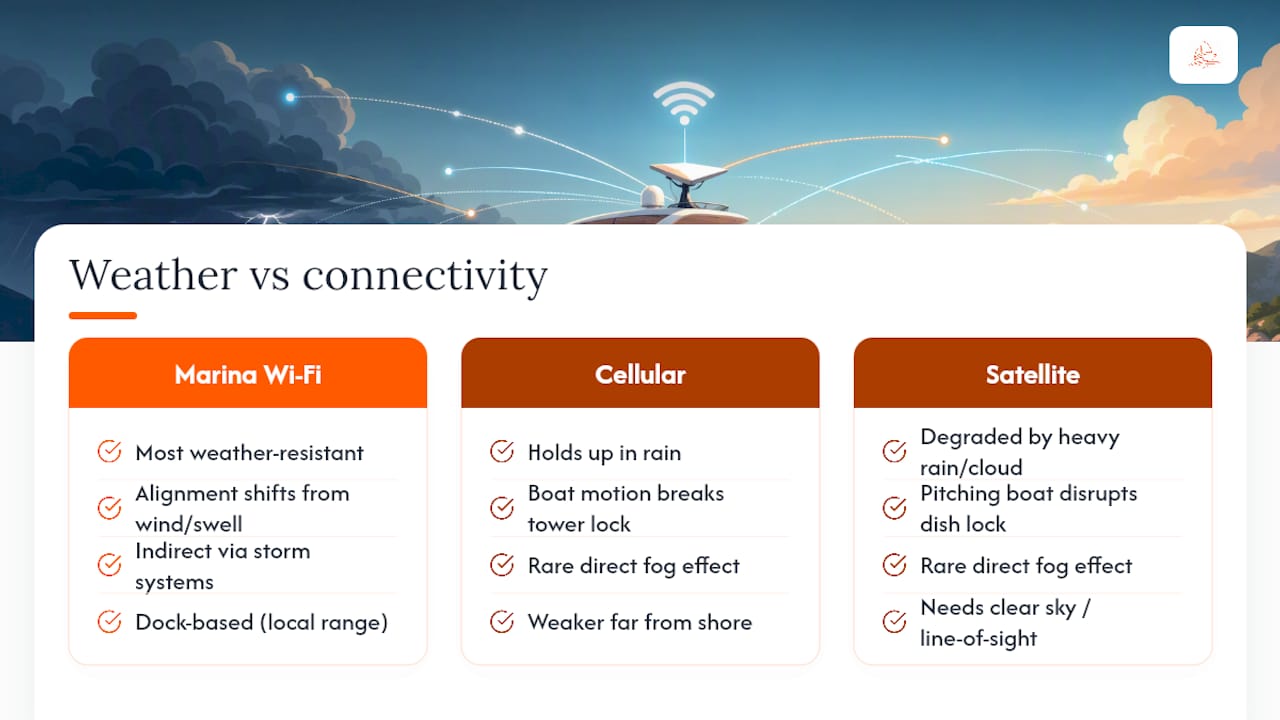
Fog rarely affects satellite or cellular signal directly, but it often coincides with the kind of low-pressure systems that bring rain and wind together, compounding the problem. High seas add a mechanical issue on top of the atmospheric one: a pitching boat makes it harder for any fixed antenna, satellite or cellular, to hold a stable connection.
The practical takeaway is to build in slack. If a call or deadline genuinely can't slip, don't schedule it for a day the forecast shows storms building, and treat any connectivity plan onboard as reliable only in reasonably calm conditions. A backup method, even a basic cellular hotspot as fallback to a primary satellite system, is worth having for exactly this reason.
Wi-Fi Security on a Charter Yacht: What to Actually Do
Shared marina networks and open onboard Wi-Fi come with the same risks as any public network: strangers on the same access point, unencrypted traffic, and routers that rarely get security updates. A few habits close most of the gap.
Avoid logging into banking or sensitive work accounts over open marina Wi-Fi without a VPN running first. A VPN encrypts your traffic so that even on a shared or unsecured network, what you send isn't readable by anyone else on the same connection. This matters more on a charter than at home, since you have no control over who else used that marina's network before you or how well it's maintained.
Change the default password on any onboard router you control, especially if the boat's Wi-Fi network was set up once and never touched again. Default credentials on marine routers are widely known and easy to guess, particularly on older hardware. If the charter company manages the network, ask whether the password is changed between charters, since a network still using last month's guest's chosen password is a real exposure.
Keep firmware updated where you have access to do so, and avoid connecting devices you wouldn't want compromised, like a work laptop with sensitive files, directly to an open network when a personal hotspot is available instead. For most leisure charterers this sounds like overkill, but for anyone doing remote work from the boat, treating onboard Wi-Fi with the same caution as airport Wi-Fi is simply the right instinct.
Managing Multiple Devices Onboard Without Slowing Everyone Down
A charter with six guests and four devices each turns into twenty-plus devices competing for the same bandwidth, and that's before anyone starts streaming.
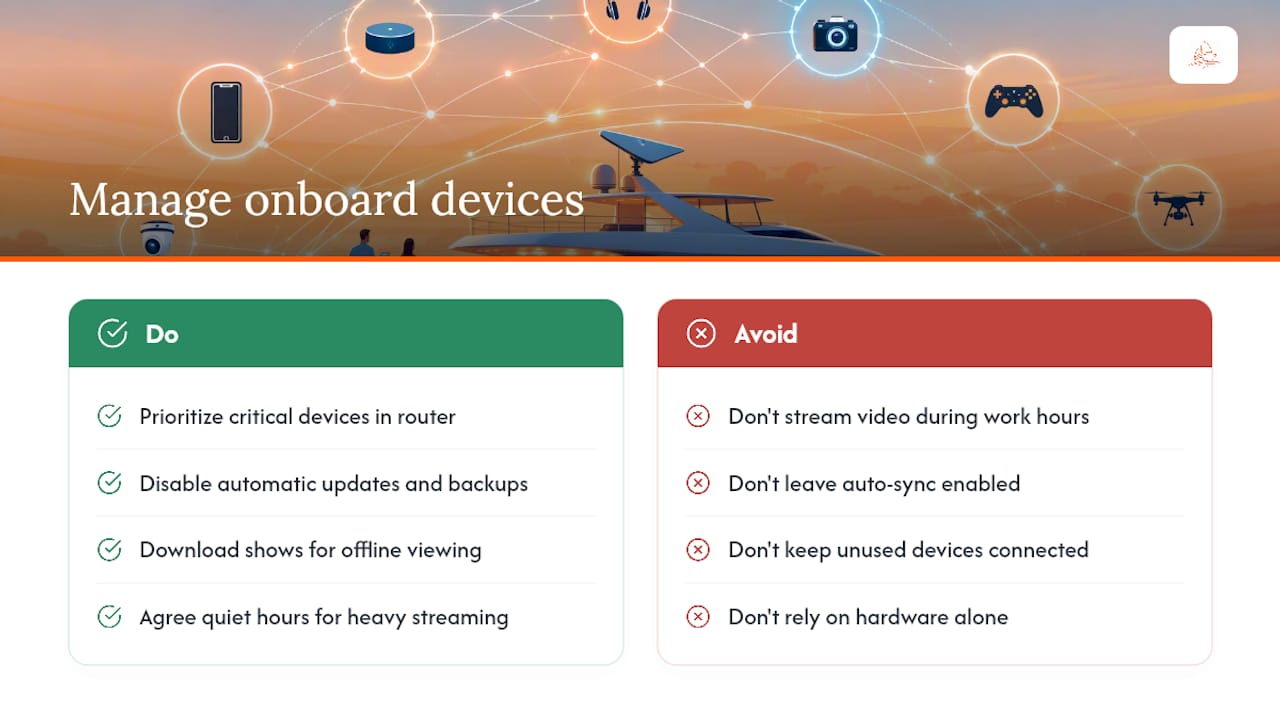
The single biggest fix is prioritization. Most marine routers let you flag specific devices, a work laptop, the boat's navigation tablet, as priority traffic, so bandwidth gets allocated to what actually matters when the network gets crowded. Turning off automatic updates and cloud backups on personal devices before the trip also frees up meaningful bandwidth, since phones and laptops will otherwise quietly sync in the background at the worst possible moment.
Streaming video is the biggest bandwidth drain by a wide margin. Downloading movies or shows onto a device before boarding, rather than streaming them live, avoids competing with everyone else's calls and browsing for the same limited pipe. If someone genuinely needs a stable connection for work, it helps to agree as a group on quiet hours for heavy streaming, particularly during the workday.
Finally, don't underestimate simple device hygiene: closing unused browser tabs, pausing app updates, and disconnecting devices nobody is using all reduce the invisible background noise eating into your connection. A boat with eight guests and disciplined device habits will often out-perform a boat with four guests and no plan at all, regardless of whose hardware is technically better. Useful apps for tracking routes or weather also tend to work better offline first, syncing only when a strong signal appears, which is worth checking with tools covered in a charter-ready app guide.
How Sailorix Helps You Verify Wi-Fi Before You Book
Charterers consistently assume marina Wi-Fi or an included router will simply handle remote work, and the mismatch between that assumption and reality is one of the most common sources of charter frustration. Our advice at Sailorix is simple: get connectivity details in writing before you confirm anything, not after.
That means asking the charter company directly whether Starlink or a marine router is standard or an add-on, and getting the answer documented rather than assumed. Using a membership model that provides real-time boat listings and booking support can make it easier to compare amenity details across multiple boats rather than relying on a single company's word. Pairing that with a prepared booking checklist turns a vague promise into a confirmed detail before you ever step aboard.
— SAILORIX
Find a Charter and Confirm Connectivity With Sailorix
Certain platforms offer a clear view of real-time availability and amenity details across a wide range of boats, sometimes with lower service fees than typical charter searches. Instead of chasing quotes from five different charter companies to find out who actually has Starlink installed, you can compare listings directly and ask specific connectivity questions before committing.

If Wi-Fi reliability is a dealbreaker for your itinerary, search available charters on Sailorix and confirm Starlink or router details directly with the boat before you book.
Sources
- Starlink introduces $185/month personal maritime plan for cruisers in small boats (and ocean data jumps 3x to 6 GB)
- Boost marina WiFi for better connectivity
- Setting up WiFi and the internet on board – Noonsite
- WiFi at sea: your guide to marine satellite internet
FAQ
How Much Is Starlink Per Month for a Yacht?
Starlink's personal maritime plan runs around $185 a month for smaller boats with roughly 6 GB of ocean data, while full maritime-grade systems for larger vessels cost considerably more in hardware and monthly fees.
How Can I Get Wi-Fi on a Boat Without Paying Extra?
Marina Wi-Fi is sometimes included free at the dock, but reliability depends heavily on distance and congestion, so confirm with the charter company whether it's complimentary or billed as an add-on before assuming it's free.
How Much Does Starlink Maritime Cost?
Pricing depends on the tier: the personal maritime plan starts near $185 a month, while dedicated maritime priority systems built for continuous offshore operation on larger vessels cost significantly more in both equipment and monthly service.
What Is the Best Wi-Fi Option for a Boat?
There's no single best option, it depends on where you're traveling. Marina Wi-Fi works dockside, a cellular hotspot or marine router covers near-shore trips, and satellite systems like Starlink are the only reliable choice once you're offshore.
How Do I Confirm Wi-Fi Details Before Booking a Charter?
Ask the charter company directly, in writing, whether Wi-Fi or Starlink is included or an upgrade, what the data cap is, and where the antenna is mounted. Comparing listings on a platform like Sailorix makes it easier to check these details across multiple boats before committing.